

 TH
TH JP
JP
In the digital age, organizations face challenges transitioning to a paperless office. Traditional document approval processes have become bottlenecks, hindering operational efficiency and agility. Imagine a salesperson needing to urgently send a quotation to a client but having to wait through multiple approval steps from a supervisor. The document takes a long time to pass from one approver to the next. Furthermore, tracking its status is cumbersome—not to mention the risk of documents getting lost along the way. These are common problems many organizations face.
iCONEXT is excited to introduce EZApprove—a system designed to solve these challenges for you.
What is EZApprove?
EZApprove is a workflow system designed to revolutionize the approval process, making it simple and fast. By combining the latest technology with an intuitive interface, it allows you to create custom templates effortlessly and approve requests conveniently from your smartphone. It also reduces approval times from several days to just a few minutes, while tracking statuses in real-time—helping employees work more efficiently.
EZApprove is ideal for small to medium-sized organizations looking to automate their workflows. This includes leave requests, expense reimbursements, and important document approvals.
Key features of EZApprove
✔ Design your perfect document templates
Create custom templates tailored to your needs using an intuitive drag-and-drop feature—no coding skills required. EZApprove provides a wide variety of components that suit all types of workflows, including:
- Free-text input fields for open-ended questions, such as name, address, and other details.
- Answer options like checkboxes or dropdown menus for easy selection.
- File upload fields to attach documents or images directly to the form.
- Date and time format settings for accurate record-keeping.
✔ Set up approval workflows
- Configure approval steps based on the form type.
- Establish multiple approval levels with more than one approver.
- Enable approval delegation for seamless processing when the primary approver is unavailable.
✔ Automatic notifications

Streamline the approval process with automatic email notifications. Approvers receive instant alerts the moment a request is submitted, ensuring faster response times and improved efficiency.
✔ Smart dashboard
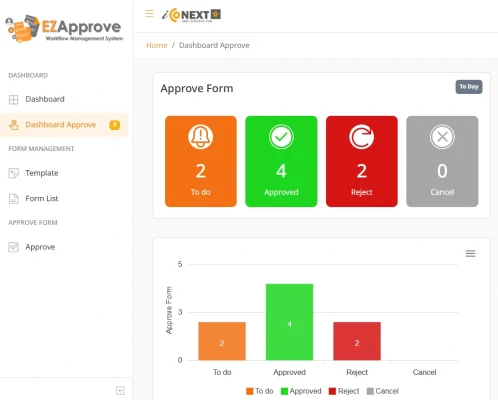
- Instantly view a real-time summary of all approval statuses.
- Track pending, approved, and rejected requests, with clickable details for quick access to each item.
✔ Report generation
- Generate detailed summary reports for each submitted form, providing clear insights into the approval process.
- Visualize report with interactive graph displayed on-screen, complete with customizable settings for a tailored view.
Example of using EZApprove
Purchasing Department
- Approve equipment purchase requests for items like computers, servers, and other office supplies.
- Approve the procurement of services essential to the organization’s operations, such as system maintenance and cleaning services.
- Approve the purchase of raw materials and components required for production.
Human Resources Department
- Approve employee leave requests swiftly and efficiently.
- Manage transportation reimbursement and overtime allowance approvals for eligible employees.
- Streamline the approval process for employee training requests.
IT Department
- Approve requests for new software.
- Grant access to critical systems, including network systems, databases, and email platforms.
- Approve IT equipment repair and maintenance requests.
Management Team
- Approve strategic documents, such as business plans, marketing plans, and product development plans.
- Authorize business agreements, including sales contracts, service contracts, and partnership agreements.
- Approve project budgets efficiently and accurately.
Benefits for your organization

- Increasing work efficiency
EZApprove streamlines the document approval process, enabling employees to work faster and more efficiently. No more time wasted waiting for approvals.
Additionally, it enhances transparency in operations by allowing real-time tracking of the approval process, enabling effective monitoring and control.

- Reducing the risk of paper loss
Submitting approvals through the EZApprove system minimizes the risk of paper loss during transmission or storage. Data is securely stored, and only authorized users have access.

- Adapting to paperless environment
Transitioning to a paperless workflow not only reduces costs associated with purchasing and storing physical documents but also minimizes environmental impact.
EZApprove makes it easy for your organization to go paperless. Users can access the system online from anywhere, making it quick and simple to search for and track documents.
EZApprove simplifies the request and approval process within your organization. It ensures seamless workflows and enhances agility for both employees and management.
To explore our demo system or request more information, feel free to contact us at thaisales@iconext.co.th or click on our Inquiry Form.
Click here to download EZApprove brochure
Read more
EZHR: Customizable employee data management system
Effortlessly request, approve, and assign your company cars with our EZBooking system
Easily manage your stock with EZStock system
Image by Freepik

