

 TH
TH JP
JP
Every day, organizations manage a large volume of documents, including PDF, Word, and Excel files, as well as quotations, purchase orders, invoices, contracts, and documents from various departments.
As the volume of documents continues to grow, traditional storage methods can make it increasingly difficult and time-consuming to find the information you need. They can also lead to problems such as lost documents, files being stored in the wrong location, or confusion over which file is the latest version.
Introducing EZDocument: Smarter Document Management
Developed from EZControl, EZDocument helps organizations manage documents systematically, find information faster, and easily access the documents they need.
We combine Full Text Search and Index Search technologies with a Web Application, users can search documents by document name, predefined information, or text contained within the documents. This makes it easier to find the required information quickly, even when dealing with a large number of documents.
Because the system operates through a Web Application, users can conveniently access and search for documents anytime and from anywhere. This helps reduce unnecessary steps, improve flexibility, and increase the overall efficiency of document management within the organization.
Common Document Management Challenges for Organizations
As the volume of organizational documents continues to grow, storing documents on individual computers or traditional shared drives may no longer be sufficient. This can lead to challenges in document management, organization, and accessibility.
- Documents being scattered across multiple folders or systems, making them difficult to manage and search.
- Documents may be lost when employees leave the organization because they were not stored in a centralized system.
- Spending a significant amount of time searching for documents, especially when there are large numbers of files or when users do not know the file name or storage location.
- Being unable to search for text within scanned PDF files, requiring users to open files individually to find the information they need.
- Having duplicate documents or multiple versions, making it difficult to determine which document is the latest version.
- Difficulty in managing access permissions, particularly for important or confidential documents that should only be accessible to authorized users.
- Difficulty tracking document usage and modification history, making it challenging to determine when a document was accessed or changed.
These challenges affect more than just document storage. They can directly impact work efficiency, data accuracy, and overall organizational productivity.
The Concept Behind EZDocument
EZDocument is designed to serve as a centralized platform for managing documents across an organization. It covers the entire document management process—from importing documents into the system, storing and categorizing them, and searching for information, to retrieving documents for use.
This helps organizations manage documents systematically and find the information they need more conveniently and efficiently.
Four Key Steps in the Document Management Process
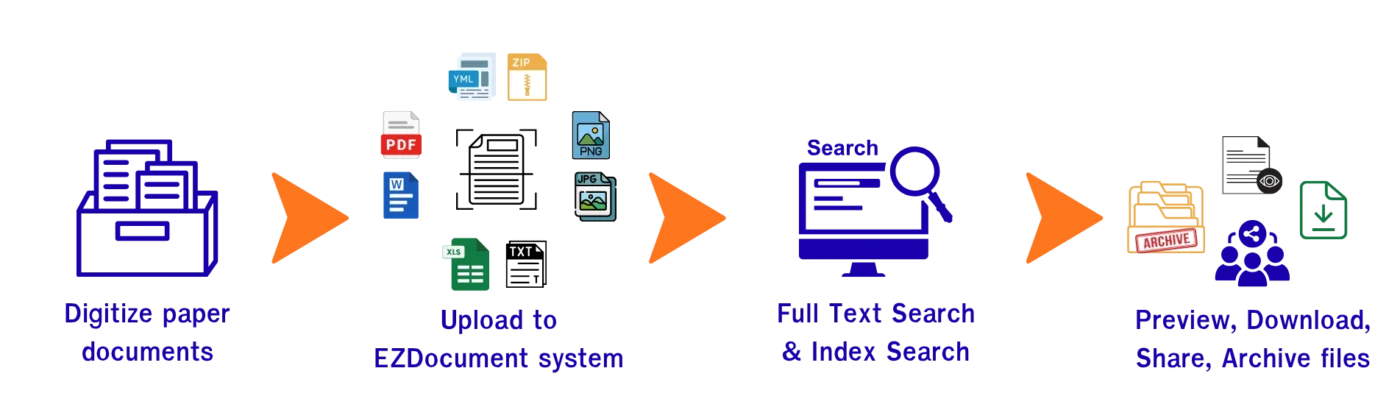
1. Digitize Company Documents
The process begins by gathering the organization’s existing documents and converting them into digital formats. These may include documents that already exist as digital files, as well as paper documents that are scanned into digital files.
This allows documents to be centrally stored and managed through the system.
2. Organize and Store Documents Systematically
Administrators can manage user permissions, organize documents by category and type, and upload documents for easier management.
The system also supports Indexing, allowing organizations to define important document information for categorization and search. In addition, Version Control helps manage multiple versions of documents, reducing confusion and making it easier to identify the correct version for use.
3. Quickly Find the Documents and Information You Need
One of the key strengths of EZDocument is its ability to search for documents in multiple ways, including Index Search, which searches predefined document information, and Full Text Search, which searches for text contained within documents.
Users do not need to remember which folder contains a particular document. By simply searching for relevant information or keywords, they can quickly locate and access the required document.
4. View and Retrieve Documents for Use
Once the required document has been found, users can preview the document within the system, download it, delete it, or move it to an archive, depending on their access permissions.
This enables the entire document management process to be handled through a single system from beginning to end.
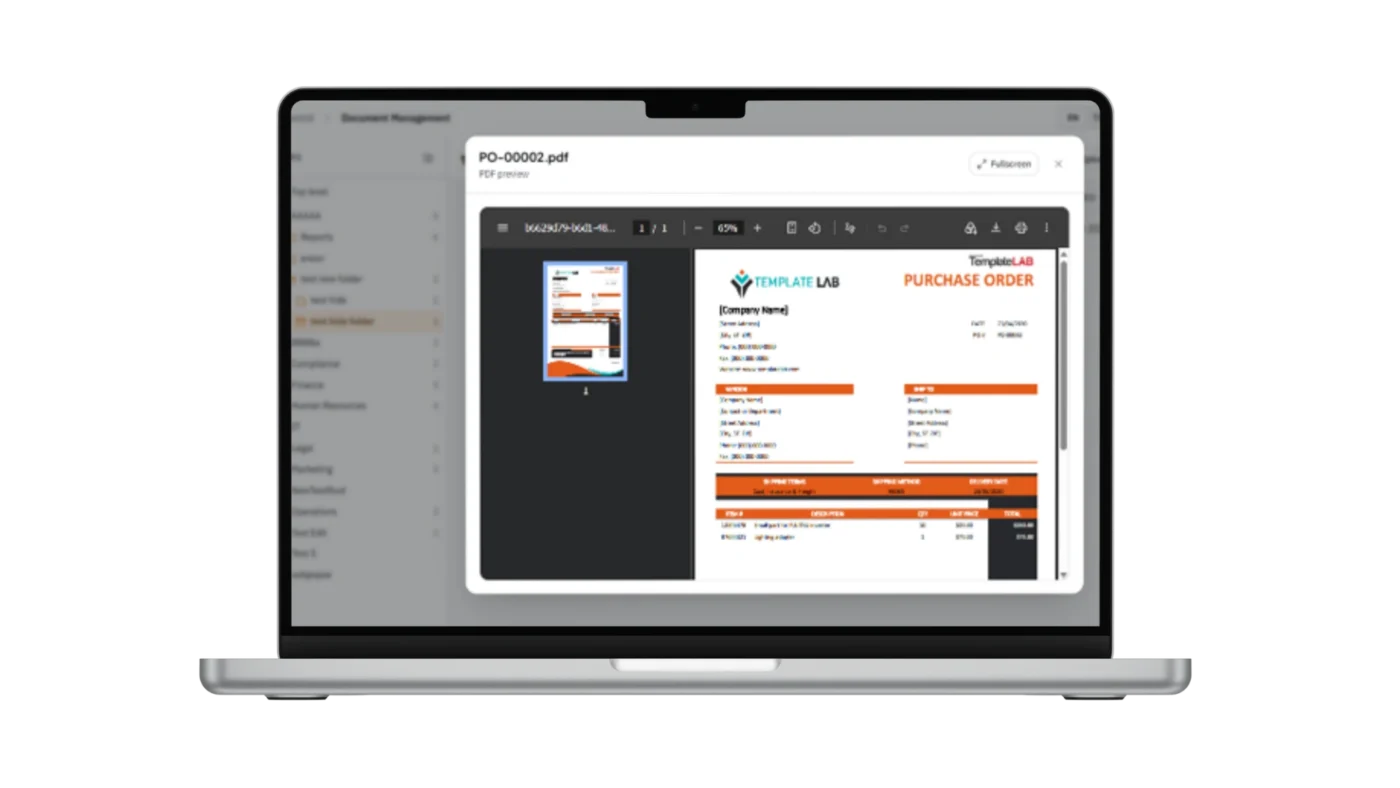
EZDocument is therefore more than simply a place to store files. It is a tool for managing the entire document lifecycle in a systematic way:
Import → Store → Categorize → Search → Retrieve
This helps reduce the time spent searching for information, minimize duplicate documents, and make organizational information more accessible.
Main Features of EZDocument
Metadata-Based Document Management
When users upload documents into the system, they can define Metadata or other important document information according to their requirements. This makes it easier to organize and search for documents later.
Each folder can also have its own Metadata Template, allowing the system to be tailored to different document types and workflows across departments.
Examples of Metadata include:
- Document Type
- Document Number
- Document Date
- Customer Name/ Supplier Name
- Department
- Person in Charge
- Project
- Expiration Date
- Version
- Status
For example, a folder for storing invoices may use Metadata such as Invoice Number, Document Date, Customer Name, and Status.
Meanwhile, a folder for project documents could include Project Name, Person in Charge, Version, and Expiration Date, depending on the organization’s requirements.
This information not only helps organize documents but can also be used as search criteria, making it easier and faster for users to locate the documents they need.
Fast and Flexible Document Search
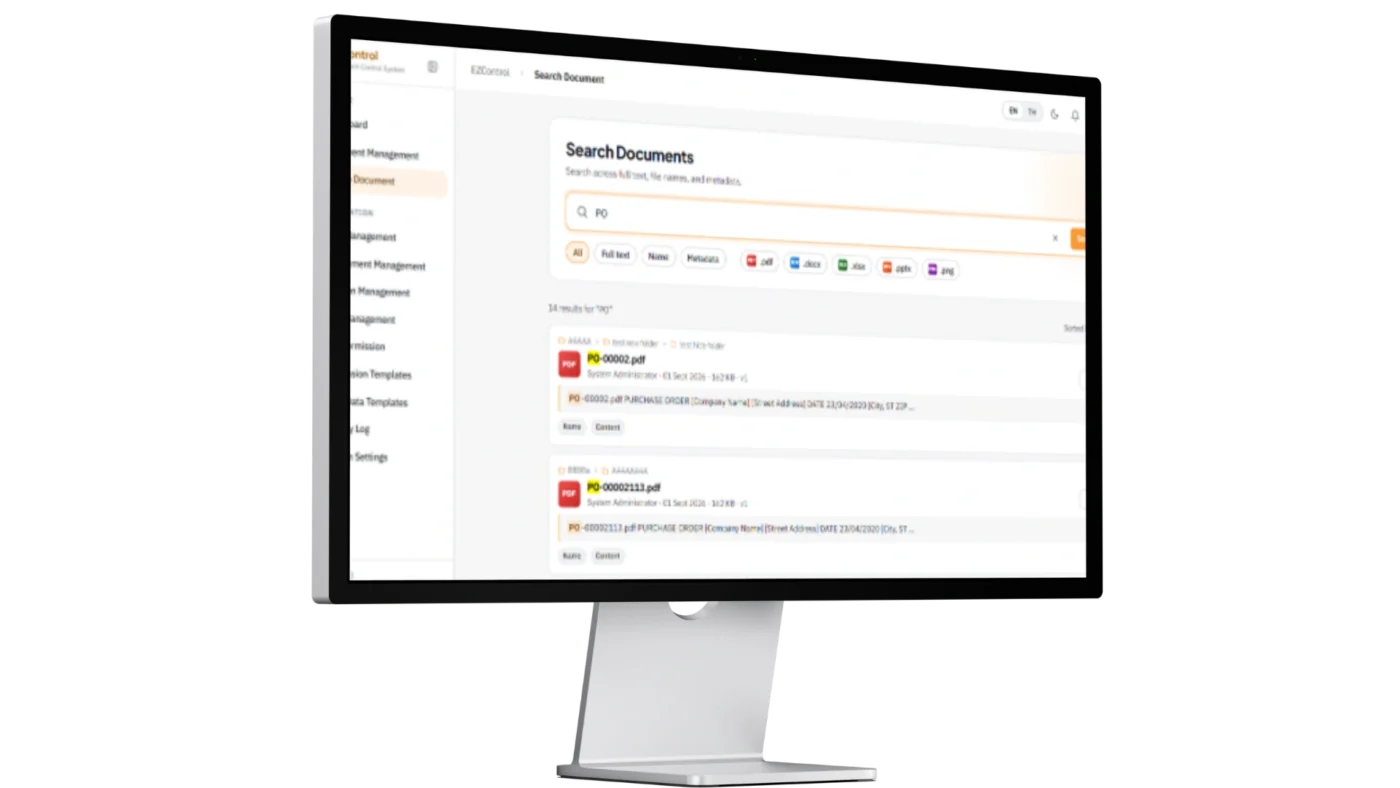
When an organization has a large number of documents, fast and accurate search capabilities are essential.
EZDocument supports multiple search methods to accommodate different types of information and user workflows.
- Full Text Search
Users can search for text or keywords contained within documents. Simply enter the desired search term, and the system will search the available content and display relevant documents.
This reduces the need to open files one by one to find specific information.
- Index Search
In addition to searching document content, users can search using Index or Metadata defined for each document type.
Examples include:
- Document Number
- Customer Name
- Project Name
- Document Date
- Status
Each folder can have different index fields based on the characteristics of the documents it contains. This provides greater flexibility and allows the search process to align with the workflows of different departments.
By combining Full Text Search and Index Search, users can search both the information about a document and the content within the document, without needing to remember the file name or folder location.
Secure Access & Permission Control
Different types of organizational documents have different levels of importance and confidentiality. Systematic document storage should therefore be combined with appropriate access control.
EZDocument allows organizations to assign user permissions based on roles, departments, projects, or specific usage requirements.

Examples of permissions include:
- View documents
- Download documents
- Edit documents
- Delete documents
- Access based on department
- Access based on project
For example, access to invoice documents can be limited to accounting department users or other authorized personnel who are permitted to view and download them, while general users would not have access.
This type of permission management enables organizations to control who can access and perform actions on different types of documents, ensuring that document management aligns with organizational policies and workflows.
Internal and External Document Sharing
Users can share documents directly with other users within the EZDocument system without needing to download files and send them via email or other communication applications. This ensures that everyone can access the same version of a document from a centralized repository.
In addition to sharing documents internally, EZDocument also supports document sharing with external parties, such as customers, business partners, auditors, or relevant organizations. The system can generate a URL for viewing or downloading a document, which can then be distributed through various channels, including email, chat systems, or other communication platforms.
Sharing documents via URL enables recipients to access files quickly and conveniently without requiring registration or login to EZDocument (subject to the organization’s security policies and access permissions).
From Document Storage to Digital Transformation
A document storage and search system is more than simply a place to store files. It is also an important component in supporting an organization’s journey toward Digital Transformation.
EZDocument covers the entire document management process, including document upload, storage and categorization, metadata management, search, access control, and document retrieval.
By bringing previously scattered information into a centralized system, organizations can manage their documents in a more structured and efficient way.
When systematic document storage is combined with powerful search technology, organizations can:
- Reduce manual processes
- Reduce the time required to find information
- Minimize duplicate document storage
- Help employees access the information they need more quickly
Ultimately, effective document management is not simply about finding a file. It is about ensuring that the information contained within documents can be efficiently managed, searched, and reused to support organizational operations in the digital age.
If you are interested in a system demonstration or would like further information, please contact us at thaisales@iconext.co.th or complete the Inquiry Form for us to reach out to you.

