

 TH
TH JP
JP
Ever felt like you’re drowning in a sea of PDFs, endless reports, or hundreds of lecture slides until your eyes start to glaze over? Suddenly, you want to scream, but you can’t!
Now, imagine having a genius sidekick who reads everything for you. This sidekick also gives you the key takeaways. It even answers any question you have about the material.
Ultimately, meet NotebookLM, your new AI-powered personal assistant from Google. It’s here to finally set you free from information overload once and for all.
What is NotebookLM?
Simply put, NotebookLM is like having your own personal library run by a genius librarian. First, all you have to do is drop in your “books,” whether they’re documents, websites, or Google Docs. Next, this AI librarian will read every single word. After that, it’s ready to chat, summarize the key points, or even answer any question you have, based solely on the materials you provided.
Forget those AIs that spit out random answers from the internet. NotebookLM stays loyal to your information, acting as a true expert on whatever topic you’re studying.
How to Use It
Follow these steps to start using NotebookLM right away:
1. Create a Notebook: Start by creating a “notebook” for the project or topic you’re interested in.
2. Add Sources: Upload the various documents you want to study into that notebook. You can upload multiple formats like PDF, Text (.txt), Google Docs, Google Slides, and even add website links.
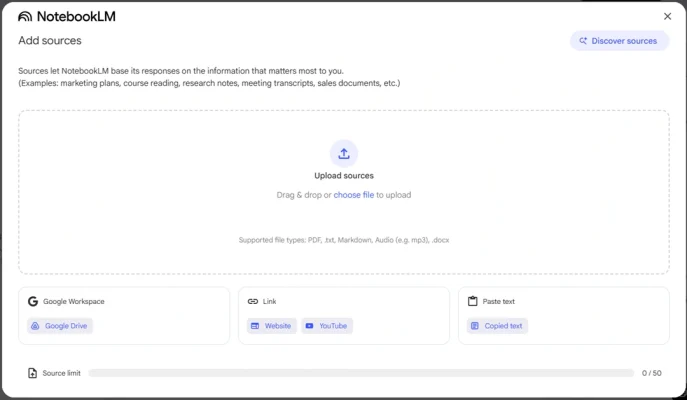
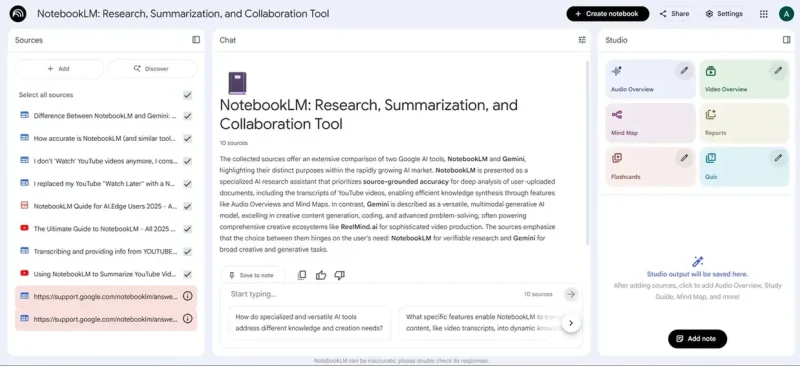
3. Start Asking Questions: Once you upload your sources, you can immediately begin chatting or asking questions about the material. From there, NotebookLM will analyze all the information and then generate answers with citations, ultimately pointing you back to the exact passage in the original source.
4. Take Notes and Summarize: You can “pin” interesting answers as quick notes, or you can ask the AI to summarize the content in various formats, which makes it easier to use later.
What Are the Coolest Features?
NotebookLM offers powerful features that simplify the way you work with information:
- Smart Summaries: It can summarize long documents down to the key points or create a summary of multiple documents combined.
- Document Q&A: Ask specific questions about the content you’ve uploaded, and the AI will find and generate a precise answer.
- Content Generation: Get help drafting emails, creating outlines for articles, or even writing video scripts based on your source materials.
- Audio Overviews: A standout feature that can turn your documents into a podcast-style conversation, allowing you to “listen” to a summary of the content.
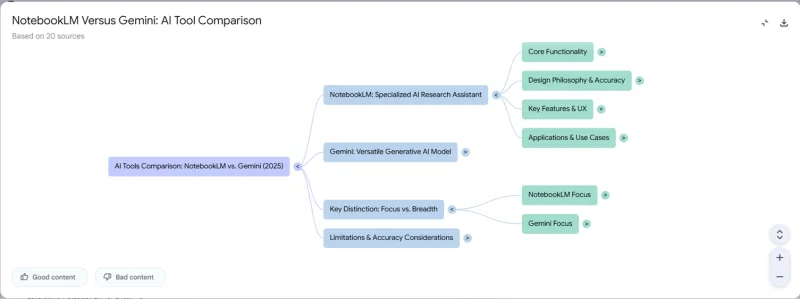
- Mind Map: Helps you create mind maps to visualize the complex connections between different ideas in your sources.
- Study Guides & FAQs: It can automatically turn your lecture notes into a study guide or generate a Frequently Asked Questions (FAQ) list from product documentation.
Example Use Cases
You can apply NotebookLM to a wide variety of situations:
- For Students: Upload textbooks, research papers, and lecture slides to create study guides, summarize complex topics, or ask questions to better understand the material.
- For Researchers/Writers: Gather research papers, articles, and interviews to find connections, identify trends, and create outlines for your next piece of writing.
- For Marketers: Analyze earnings reports, market surveys, and competitor data to build marketing strategies or summarize key takeaways for team presentations.
- For Product Teams: Compile product documentation, user feedback, and technical specs to create an FAQ or use it as a knowledge base for answering questions.
Benefits of NotebookLM
- Saves Time: Drastically reduces the time spent reading and understanding large volumes of documents.
- Increases Productivity: Helps you access deep insights and distill key ideas quickly.
- Get Accurate, On-Point Answers: Because the AI grounds its answers directly in your documents, the responses are reliable and relevant to your context.
- Unlocks Creativity: Helps you see new connections in your data and easily create content in various formats.
- Easy to Use: Features a user-friendly interface that allows anyone to get started right away.
NotebookLM isn’t just a note-taking tool. It’s a “thinking partner” that helps you work with information more intelligently and efficiently. Go ahead and give it a try, you’ll be hooked!
Read more:

